


Cricket League
4.61.56K Reviews
App Specs
- Version
- 1.34.0
- Updated On
- License
- Free
- Downloads
- 100,000,000+
- Developer
- Miniclip.com
- Categories
- Sports
- Platform
- Android, iOS
Screenshots
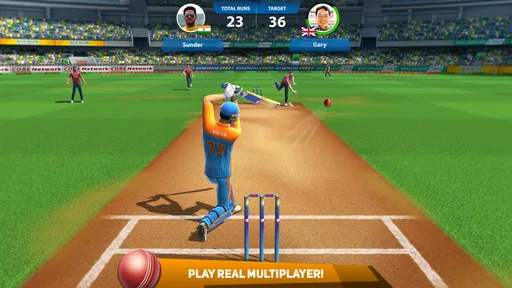
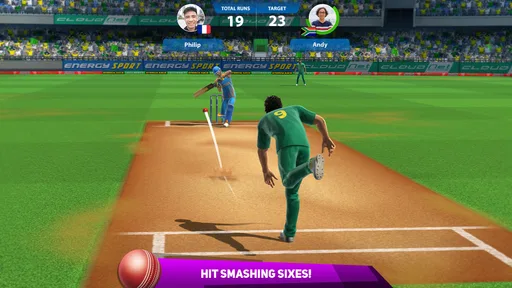
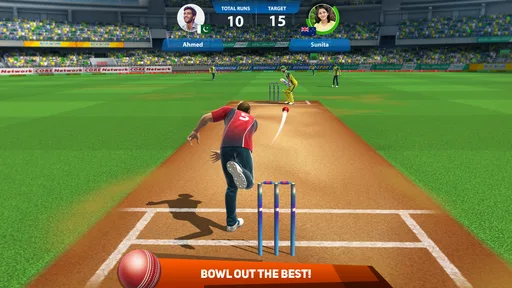


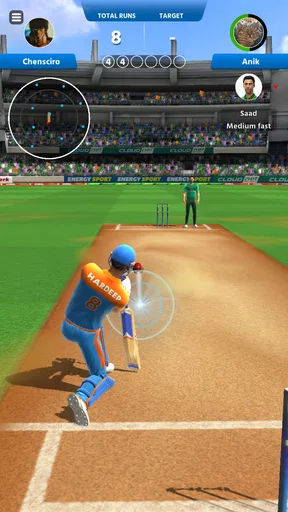
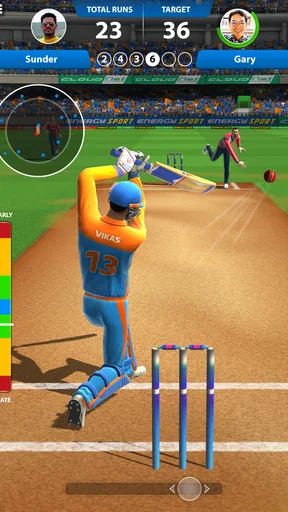
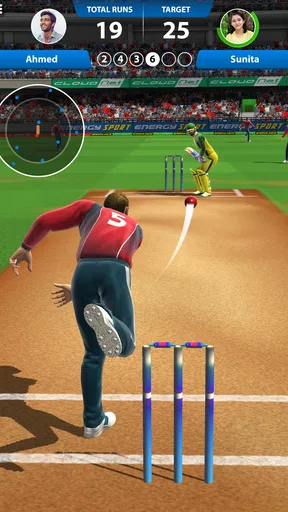
 Analysis by AppCompare
If you enjoy cricket but don’t always have time for a long match, I can see the appeal of a compact game built around quick head-to-head play. Cricket League is a free sports game from Miniclip.com, and its central idea is simple: take turns batting and bowling in a short contest where each decision matters. It has a 4.7 average from around 3.3 million ratings and over 100 million installs, so it has clearly found a large audience. My main advice is to approach it as an arcade-style cricket game rather than a full simulation; that difference makes it easier to know whether its quick rhythm suits you.
Gameplay and Features
I approach Cricket League as a game of quick decisions, so this section looks at how its batting-and-bowling rhythm works in practice and what makes a short match engaging. I’ll also consider how to build a steady routine around each delivery, which leads naturally to the settings and habits that can make play feel more comfortable.
A simple match routine that rewards attention
The first thing that caught my eye about Cricket League was its intuitive gameplay. Whether you're a seasoned player or a newbie, the controls are straightforward. You can swipe to bat and bowl, and the response is smooth, without any lag. It's almost as if the game reads your mind, making it incredibly satisfying when you hit that perfect six.
What gives those simple gestures some bite is the short match format. Each contest uses two overs, so you don’t have a long innings in which to recover from careless choices. I find it helps to treat every delivery as a small decision: watch the bowler’s approach, pick a batting response deliberately, and avoid swiping just because the ball is coming. When bowling, vary your thinking instead of repeating the same delivery pattern. A quick match is still short enough for a break, but there is room to learn from a mistake and adjust on the next ball.
What I love most about this game is its variety of modes. You can dive into quick matches if you're short on time or immerse yourself in tournaments for a more comprehensive experience. The multiplayer option is a game-changer, allowing you to compete against players from around the globe. It's a great way to test your skills and see how you stack up against others.
That mix makes the game useful in different situations. A quick match fits into a few spare minutes while waiting for a friend or taking a short break; a tournament is better when I have time to focus and want a sense of continuation. Multiplayer is the more unpredictable option, because an opponent’s choices can make a familiar batting or bowling rhythm less reliable. If you want a quiet, completely self-paced experience, the competitive side may feel less relaxing than a solo sports game.
Settings and a more comfortable session
Before settling into repeated matches, I’d check the device’s sound level and any available in-game control or audio settings, then keep the setup consistent. That sounds minor, but batting and bowling both rely on deliberate swipes, and changing how you hold the phone or play with sound on versus off can make your timing feel different. I prefer to choose a comfortable grip and screen orientation before a competitive match rather than adjusting midway through.
Worth Reading Before You Choose

Baby Panda World Brings Quick Play to Modern Phones, but Its Game Library Feels Busy

ESPN’s Live Game View Makes Following Close Games Easier

QuizzLand Review: A Good Fit for Short Trivia Breaks, Not Every Player

Basketball Stars: Multiplayer Is Fast, but Can It Recover When Matches Go Wrong?

WEBTOON Turns Phone Updates Into a Better Reading Routine

Link to Windows Runs on Shared Habits, Not Social Feeds
The game is free to download and is rated for Everyone, which makes it approachable for a broad audience. It also offers in-app purchases, with items ranging from $0.49 to $99.99, so I’d decide in advance whether I’m happy to play without spending or want to consider optional purchases. The key is not to confuse a short match with a commitment to keep buying: the core appeal is the batting-and-bowling contest, and you can judge whether the game itself is fun before putting money into it.
Graphics and Sound
The graphics are vibrant and detailed, capturing the essence of a real cricket match. The stadiums are beautifully designed, and the player animations are fluid and realistic. The attention to detail is impressive, from the shadows on the pitch to the crowd's reaction in the stands.
Sound-wise, the app doesn't disappoint. The ambient sounds of the stadium, the crack of the bat, and the enthusiastic commentary all add to the immersive experience. It's the little things that make the game feel authentic, and the presentation helps each short contest feel like a match rather than a bare sequence of gestures.
For everyday use, I would treat audio as atmosphere rather than something you must have turned up. With the sound on, the crowd and impact effects add a little drama; with it off, the visual action still carries the basic rhythm. That makes the game easier to fit into a shared room, a commute, or a quiet break without making the experience depend on loud effects. The quick format is especially handy when I want a sports game I can pause between real-life tasks rather than a session that demands a long uninterrupted stretch.
Customization and Progression
Another aspect that stands out is the customization. You can create your own team, choose your players, and even decide on your team's jersey. This level of personalization adds a layer of depth to the game, making it more engaging and personal.
As you progress, you earn rewards and unlock new features. This keeps the game fresh and motivates you to keep playing. The leveling system is balanced, ensuring that you don't get bored or feel overwhelmed.
My practical tip is to separate the fun of shaping a team from the urge to chase every reward. Customizing a side can make matches feel more personal, but it doesn’t replace learning how to read an opponent. I’d first establish a steady batting and bowling routine, then use progression as a reason to keep experimenting rather than as proof that every session needs to be longer. If you only want a quick cricket diversion, the ability to personalize your team is a bonus, not a task list you need to complete.
Challenges and Special Events
The app frequently introduces challenges and special events, which are a blast to participate in. These events often have unique rules or special rewards, adding an extra layer of excitement. It's a great way to break the routine and try something new.
One of my favorite events involved limited overs and power-ups that changed the dynamics of the game. It was a refreshing twist that tested my strategic skills and kept me on my toes.
Events are most useful when the standard match pattern starts to feel familiar. I’d enter one with the intention of adapting, not assuming that the same decisions will work under changed rules. That’s a small but meaningful distinction: a special format can be entertaining precisely because it asks you to rethink your usual approach. If you prefer stable rules and a predictable practice routine, the regular matches are likely to be the better place to spend your time.
Faster habits and competitive play
Once the controls feel familiar, the best shortcut is a repeatable decision process, not frantic swiping. I try to observe the delivery, commit to a shot, and then review the result before the next ball. On the bowling side, I avoid turning one successful delivery into a fixed formula; a player who expects the same choice can be harder to surprise. These habits don’t require a hidden setting or complicated trick, just a little patience in a format that otherwise encourages quick reactions.
A realistic routine might be one match during a lunch break, followed by a pause rather than an automatic run of rematches. That keeps the game’s short sessions convenient and gives me a chance to notice whether I’m actually improving or simply repeating the same mistake. For a cricket fan who wants a fast contest against another person, that rhythm is a strength. For someone looking for detailed batting practice, long innings, or the slower tactical build-up of a full cricket simulation, a more simulation-focused alternative will be a better fit.
Community and Social Features
Engaging with the community is easy and fun. You can chat with other players, join clubs, and participate in discussions. The social features enhance the experience, making it feel like you're part of a larger cricket-loving community.
The leaderboard is another cool feature, giving you bragging rights when you climb to the top. It adds a competitive edge to the game, pushing you to improve and refine your skills.
The social layer suits players who enjoy comparing progress and having a reason to return beyond the next match. It is less essential if your goal is simply to play a few balls and close the app. I’d also keep the competitive comparison in perspective: a leaderboard can make a good session feel rewarding, but it is not the same as improving a particular skill. If you find rankings make a casual game stressful, you can focus on the match itself and treat community features as optional.
Where the quick format reaches its limits
The same compact design that makes this game easy to pick up also narrows its appeal. Two overs give each contest a brisk pace, but they don’t offer the long-form ebb and flow that cricket fans may want from a simulation. Matches can feel intense because there is little time to recover, yet that also means a rough start can shape the whole result. Players who want to manage a full innings, settle into a slower strategic contest, or practice cricket in a detailed simulation should look elsewhere.
There is also a trade-off between social competition and a fully controlled solo experience. Playing against other people can keep matchups fresh, while a consistent routine is easier when you are not reacting to another person’s choices. I would choose based on mood: quick competitive play when I want an opponent, and a different cricket game when I want a longer, more deliberate session. The current version is 1.31.1, and the game supports Android 6.0 and later; it is also available as a free-to-play option, with optional purchases rather than an upfront price.
Final Thoughts
Overall, Cricket League is a fantastic app for cricket enthusiasts. The combination of approachable controls, short competitive matches, and a lively presentation makes it a strong choice for people who want cricket action without setting aside a long stretch of time. I’d recommend it most to casual players, fans who enjoy quick head-to-head contests, and anyone who likes improving through repeated short attempts.
I would skip it if my priority were a deep cricket simulation, long innings, or a calm solo experience with no competitive pressure. For those needs, the usual alternatives in the sports category that focus on fuller match management are a better match. Here, the appeal is making a few choices under pressure, seeing how they turn out, and trying a smarter approach next time.
Pros
- Intuitive controls for seamless gameplay.
- Variety of teams and players to choose from.
- Quick match mode for on-the-go play.
- Realistic graphics enhance the experience.
- Regular updates with new features.
Cons
- Occasional lag during multiplayer matches.
- Limited customization options for players.
- In-app purchases can be pricey.
- Requires stable internet connection.
- Some ads disrupt gameplay flow.
FAQs for Cricket League
What is Cricket League and what platforms is it available on?
Cricket League is a dynamic and engaging cricket simulation game available on both Android and iOS platforms. The app offers players the opportunity to experience cricket matches with realistic graphics and intuitive controls. It caters to both casual gamers and cricket enthusiasts looking for a mobile cricket experience.
Is Cricket League free to play, or are there in-app purchases?
Cricket League is free to download and play, but it does offer in-app purchases. These purchases can enhance the gaming experience by providing access to special items, player upgrades, and other features. While optional, they can provide a competitive edge and additional customization options.
What are the key features of Cricket League that set it apart from other cricket games?
Cricket League stands out with its realistic gameplay mechanics, stunning graphics, and a wide variety of modes, including multiplayer options. It also features a comprehensive player customization system, live events, and an online leaderboard that lets players compete globally. These features contribute to an immersive and competitive cricket gaming experience.
Does Cricket League require an internet connection to play?
Cricket League primarily requires an internet connection, especially for its multiplayer features and live events. However, there are offline modes available where players can enjoy single-player matches and practice sessions. This flexibility allows users to play anywhere, whether online or offline.
How does Cricket League ensure fair play and prevent cheating?
Cricket League incorporates several anti-cheat measures to ensure a fair gaming environment. It uses advanced algorithms to detect and deter cheating behavior. Additionally, the game regularly updates its security features and community guidelines to promote sportsmanship and maintain a level playing field for all participants.


